A Guide to Cloud — Website
| Field | Detail |
|---|---|
| Status | ✅ Live |
| Live URL | www.aguidetocloud.com |
| Repo | susanthgit/aguidetocloud-revamp |
| Local path | C:\ssClawy\aguidetocloud-revamp |
| Previous platform | Squarespace |
| New platform | Hugo → Azure Static Web Apps (Standard, $9/mo) |
What we built
Migrated the entire website from Squarespace to a custom Hugo static site on Azure, with a visual CMS, auto-deploy pipeline, and YouTube integration.
Architecture
┌──────────────────────────────────────────────────────────┐
│                    Content Sources                        │
│                                                          │
│   ✏️ Sveltia CMS        📡 YouTube Scan      💻 Local   │
│   (visual editor)       (GitHub Action)      (terminal) │
│   /admin panel          manual trigger       git push   │
│                                                          │
└────────┬─────────────────────┬──────────────────┬────────┘
         │                     │                  │
         ▼                     ▼                  ▼
┌──────────────────────────────────────────────────────────┐
│              GitHub Repository (main branch)              │
│              susanthgit/aguidetocloud-revamp              │
└────────────────────────┬─────────────────────────────────┘
                         │ push triggers
                         ▼
┌──────────────────────────────────────────────────────────┐
│              GitHub Actions (deploy.yml)                  │
│              Hugo build → SWA deploy (~60s)               │
└────────────────────────┬─────────────────────────────────┘
                         │
                         ▼
┌──────────────────────────────────────────────────────────┐
│           Azure Static Web Apps (Standard)                │
│           www.aguidetocloud.com                           │
│           preview.aguidetocloud.com                       │
│           red-sand-0c2ca9d00.4.azurestaticapps.net       │
└──────────────────────────────────────────────────────────┘
Tech stack
| Component | Technology | Cost |
|---|---|---|
| Static site generator | Hugo (custom theme, no packaged theme) | Free |
| Hosting | Azure Static Web Apps (Standard tier) | $9/mo |
| CMS | Sveltia CMS at /admin |
Free |
| CMS auth | Cloudflare Worker (sveltia-cms-auth.susanth-ss.workers.dev) |
Free |
| OAuth | GitHub OAuth app ("A Guide to Cloud CMS") on susanthgit |
Free |
| CI/CD | GitHub Actions (Hugo build + SWA deploy on push) | Free |
| YouTube scan | GitHub Action + YouTube Data API v3 | Free |
| DNS | Cloudflare (CNAME flattening for apex domain) | Free |
| SSL | Auto-provisioned by Azure SWA | Free |
Total monthly cost: $9/mo (SWA Standard)
Content structure
| Section | Path | Videos | Card style |
|---|---|---|---|
| 🤖 AI Hub | content/ai-hub/ |
17 | tag_class: ai |
| ☁️ Cloud Labs | content/cloud-labs/ |
19 | tag_class: cloud |
| 📜 Certifications | content/certifications/ |
14 | tag_class: cert |
| ❓ Exam Q&A | content/exam-qa/ |
20 | tag_class: cert |
| 💼 Interview Prep | content/interview-prep/ |
3 | tag_class: cloud |
| 🎵 Study Music | content/music/ |
5 | tag_class: music |
| 📰 AI News | content/ai-news/ |
Client-side rendered | Via ainews pipeline |
Video page frontmatter
Every video page is a Markdown file with this structure:
---
title: "Video Title Here"
date: 2026-03-17
youtube_id: "FHD3Sez_MeU"    # ← the ID from the YouTube URL
card_tag: "M365 Copilot"     # ← shown on the card badge
tag_class: "ai"              # ← controls badge colour
tags: ["tag1", "tag2"]       # ← for search/filtering
featured: false              # ← toggle to make Author's Pick
views: 1352
likes: 21
---

Optional description text here.
Three ways to manage content
1. Visual CMS (easiest — for content edits)
- Go to www.aguidetocloud.com/admin
- Log in with GitHub (
susanthgit) - Click a section → click a video → edit fields → Save
- Auto-deploys in ~60 seconds
Use for: Editing titles, tags, setting Author's Pick, adding new videos manually.
2. YouTube auto-scan (for new videos)
- Upload video to YouTube
- Go to GitHub Actions
- Click "Scan YouTube for New Videos" → Run workflow
- Script finds new videos, creates
.mdpages, auto-deploys
Use for: Adding new YouTube videos to the site. Never overwrites existing edits.
How YouTube Video ID works:
YouTube URL:    https://www.youtube.com/watch?v=1WAPZoxtPjU
                                               ^^^^^^^^^^^
                                               This is the Video ID

Share link:     https://youtu.be/1WAPZoxtPjU
                                ^^^^^^^^^^^
                                Same ID here
3. Ask Copilot CLI (for layout/template changes)
For anything structural — template changes, CSS updates, new sections, bulk operations — ask in a Copilot CLI session. Changes are committed to GitHub and auto-deploy.
Custom domains & DNS
All domains are managed via Cloudflare DNS (nameservers: cleo.ns.cloudflare.com / heidi.ns.cloudflare.com).
DNS Records
| Subdomain | Type | Target (Azure SWA) | Cloudflare Proxy |
|---|---|---|---|
aguidetocloud.com (root) |
CNAME (flattened) | red-sand-0c2ca9d00.4.azurestaticapps.net |
✅ On (orange cloud) |
www |
CNAME | red-sand-0c2ca9d00.4.azurestaticapps.net |
✅ On (orange cloud) |
learn |
CNAME | brave-island-019a58c0f.4.azurestaticapps.net |
❌ Off (grey cloud — required for Azure SWA) |
preview |
CNAME | red-sand-0c2ca9d00.4.azurestaticapps.net |
❌ Off (grey cloud — required for Azure SWA) |
Azure SWA + Cloudflare Proxy
Azure Static Web Apps needs DNS only (grey cloud) for subdomains like learn and preview. If you turn on the orange cloud proxy, Azure SWA can't validate the custom domain and SSL will break.
The root domain and www can use Cloudflare proxy because they were set up with Cloudflare's CNAME flattening.
Cloudflare DNS Screenshot (Reference)
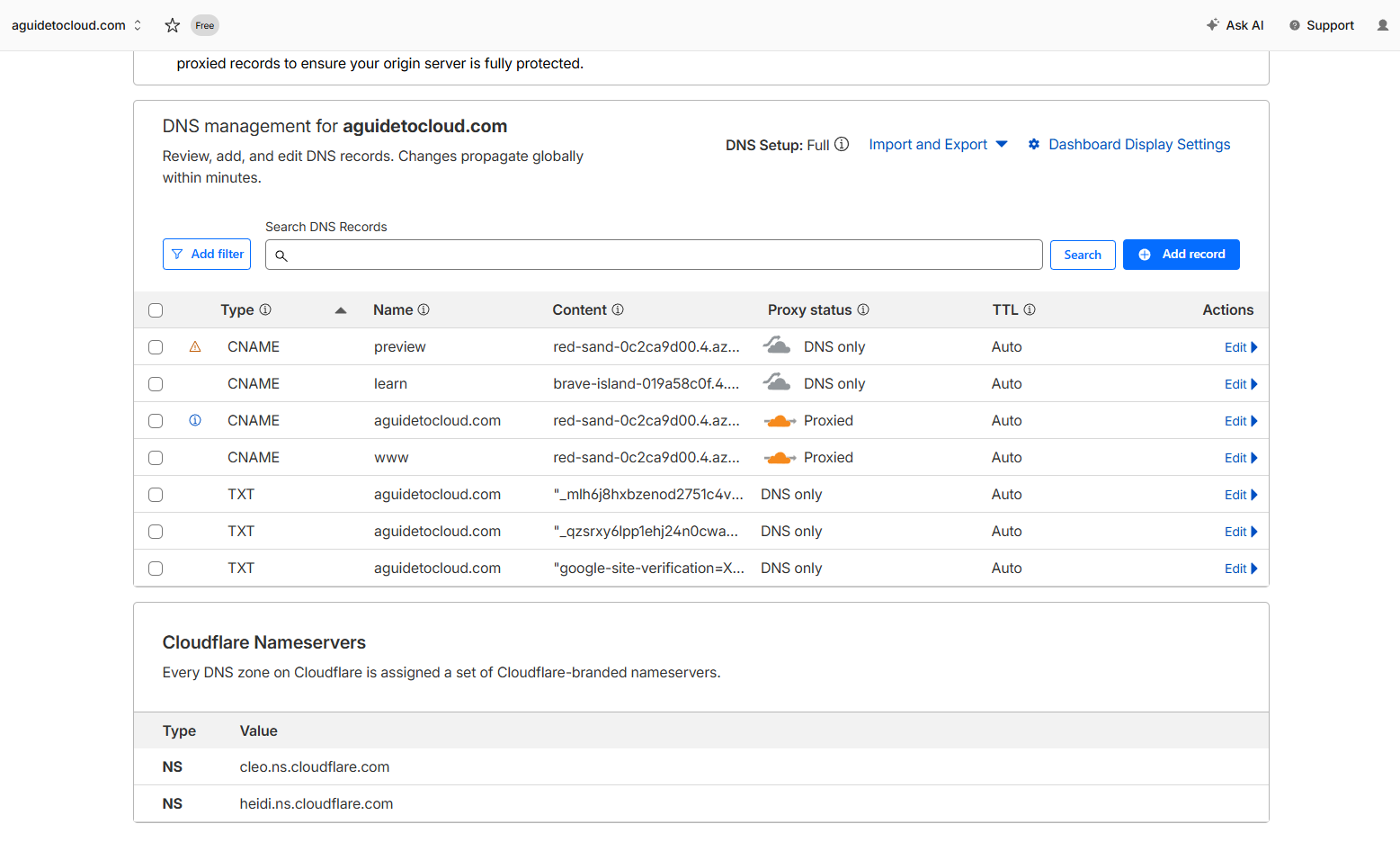
Screenshot taken: March 2026. If records go missing again, recreate from the table above.
Azure Static Web Apps
| SWA Resource | Default Hostname | Custom Domains |
|---|---|---|
aguidetocloud-revamp |
red-sand-0c2ca9d00.4.azurestaticapps.net |
aguidetocloud.com, www.aguidetocloud.com, preview.aguidetocloud.com |
sutheesh-learning-hub |
brave-island-019a58c0f.4.azurestaticapps.net |
learn.aguidetocloud.com |
If DNS breaks again
- Check Cloudflare dashboard → DNS → Records
- Compare against the table above
- Re-add any missing CNAME records
- Set proxy to DNS only (grey cloud) for
learnandpreview - Wait 2–5 minutes for propagation
- Verify:
Resolve-DnsName learn.aguidetocloud.comin PowerShell
GitHub secrets
| Secret | Repo | Purpose |
|---|---|---|
AZURE_STATIC_WEB_APPS_API_TOKEN |
aguidetocloud-revamp |
SWA deploy token |
YOUTUBE_API_KEY |
aguidetocloud-revamp |
YouTube Data API v3 |
📊 Analytics
Your site runs two free analytics tools — use them together for the full picture.
| Tool | What it tells you | Dashboard link |
|---|---|---|
| Google Analytics 4 | Traffic, page views, bounce rate, visitor sources, geography | 🔗 analytics.google.com |
| Microsoft Clarity | Heatmaps, session recordings, rage clicks, scroll depth | 🔗 clarity.microsoft.com |
Google Analytics 4 (GA4)
- Measurement ID:
G-2HWWZGWCD0 - Location:
layouts/partials/analytics.html - Only runs in production (not during local Hugo dev server)
Key reports to check:
| What you want | Where in GA4 |
|---|---|
| Page views | Reports → Engagement → Pages and screens |
| Bounce rate | Reports → Engagement → Pages and screens |
| Where visitors come from | Reports → Acquisition → Traffic acquisition |
| Top countries/cities | Reports → User attributes → Demographic details |
| Desktop vs mobile | Reports → Tech → Tech overview |
Microsoft Clarity
- Project ID:
w44u6ylgj1 - Added: 2026-03-31
- Location:
layouts/partials/analytics.html(right after GA4 script)
What makes Clarity special:
- 🔥 Heatmaps — see where people click and how far they scroll
- 🎥 Session recordings — watch real visitors navigate your site
- 😤 Rage clicks — find UI elements that frustrate users
- 📊 Dashboard — auto-generated insights, no setup needed
Best practice
Check Clarity weekly to spot UX issues. Look for rage clicks and scroll depth — are people reading your full tutorials?
🔍 SEO & Social Sharing (OpenGraph)
OpenGraph tags control how your site looks when shared on LinkedIn, Teams, WhatsApp, etc.
Validated with: opengraph.xyz
Current metadata (optimised 2026-03-31)
| Tag | Value | Length |
|---|---|---|
og:title |
A Guide to Cloud & AI — Your AI & Cloud Skills Hub | 50 chars ✅ |
og:description |
Your AI & Cloud Skills Hub — Hands-on tutorials, step-by-step labs, certification prep & interview guides for Microsoft 365, Azure & AI beginners | 145 chars ✅ |
og:image |
/images/og-default.jpg |
— |
og:type |
website (homepage) / article (other pages) |
— |
Where it's configured:
- Title & description values:
hugo.toml→[params]section - Meta tag templates:
layouts/_default/baseof.html(lines 6-25) - JSON-LD structured data:
layouts/partials/seo-jsonld.html
After changing metadata
Social platforms cache OG tags aggressively. After changes, use these to force a refresh:
- LinkedIn: linkedin.com/post-inspector
- Facebook/WhatsApp: developers.facebook.com/tools/debug
- Twitter/X: cards-dev.twitter.com/validator
Key files
| File | Purpose |
|---|---|
hugo.toml |
Hugo config (baseURL, metadata, taxonomies) |
layouts/_default/baseof.html |
Base HTML template (head, meta tags, OG tags) |
layouts/partials/analytics.html |
GA4 + Microsoft Clarity tracking scripts |
layouts/partials/seo-jsonld.html |
Structured data for search engines |
layouts/index.html |
Homepage template (Latest Videos, Author's Pick, sections) |
layouts/partials/video-card.html |
Video card component |
layouts/_default/single.html |
Individual video page (YouTube embed) |
layouts/_default/list.html |
Section listing page |
static/admin/index.html |
Sveltia CMS entry point |
static/admin/config.yml |
CMS collection definitions |
static/staticwebapp.config.json |
URL redirects (old Squarespace paths) |
scripts/scan-youtube.js |
YouTube auto-scan script |
scripts/generate-content.js |
Original content generation script |
.github/workflows/deploy.yml |
Auto-deploy on push |
.github/workflows/scan-youtube.yml |
YouTube scan (manual trigger) |
data/videos-fresh.json |
Master video data file (77 entries) |
Timeline
| Date | What happened |
|---|---|
| 2026-03-31 | Fixed missing DNS records for learn. and preview. subdomains in Cloudflare — both CNAME records were missing, causing ERR_NAME_NOT_RESOLVED |
| 2026-03-31 | Fixed nav dropdown hover gap (margin-top → padding-top) |
| 2026-03-31 | Custom OG image for About page (1200×630, user-designed) |
| 2026-03-31 | About page rewrite: headshot, career timeline, resume download, Person schema, LinkedIn links, AI Pivot with magenta glow |
| 2026-03-31 | Welcome strip: lighter title, swapped glow colours, search icon first, LinkedIn on name |
| 2026-03-31 | Footer fix: corrected YouTube URL, added both channels, LinkedIn on name |
| 2026-03-31 | PR preview environments enabled in GitHub Actions |
| 2026-03-31 | Phase 3: Site search (Ctrl+K), self-hosted fonts, apple-touch-icon, skip-to-content, removed dead theme switcher |
| 2026-03-31 | Phase 2: WebP images (83% smaller), lazy YouTube iframes, WCAG AA contrast fix, RSS discovery, Organization + BreadcrumbList schema |
| 2026-03-31 | Phase 1: Security headers, rel="noopener noreferrer", fixed broken redirects |
| 2026-03-31 | Added Microsoft Clarity analytics (heatmaps + session recordings) |
| 2026-03-31 | Fixed OpenGraph metadata — title 21→50 chars, description 94→145 chars |
| 2026-03-31 | Expanded all 7 section page OG descriptions to 147-158 chars |
| 2026-03-30 | DNS migrated to Cloudflare (CNAME flattening, CDN, DDoS protection) |
| 2026-03-30 | Hugo site built, deployed to Azure SWA |
| 2026-03-30 | SWA upgraded to Standard ($9/mo) for 3+ custom domains |
| 2026-03-30 | Apex domain redirect configured in Squarespace |
| 2026-03-30 | GitHub Actions auto-deploy pipeline set up |
| 2026-03-30 | Sveltia CMS deployed with GitHub OAuth via Cloudflare Worker |
| 2026-03-30 | YouTube auto-scan workflow created and tested (found 3 new videos) |
| 2026-03-30 | Featured flags cleaned up, category pills removed |
| 2026-03-30 | All 78 video pages live across 6 sections |
What we learned
- Azure SWA Free tier limits you to 2 custom domains — Standard ($9/mo) gives 5
- Squarespace DNS doesn't support ALIAS/ANAME records — use domain forwarding for apex domains
- Sveltia CMS is a great free visual editor for Hugo — needs a Cloudflare Worker for OAuth
- Invisible BOM characters from copy-paste can break OAuth forms and path inputs — always type manually
- GitHub Actions makes auto-deploy trivial — push = live in 60 seconds
- YouTube Data API v3 needs to be explicitly enabled in Google Cloud Console (not just the project)
- Hugo has no packaged theme — this is a fully custom build with layouts in
layouts/